Product Detail

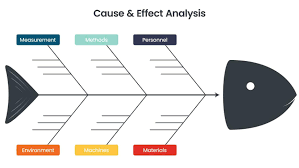
Fishbone chart

Tool Is Certified by Microsoft:


Problem Statement

Organizations often struggle with complex problem-solving due to challenges in identifying interconnected causes, inefficient analysis tools, and data integration issues. Traditional methods and tools may lack the flexibility and visual clarity needed to effectively represent cause-and-effect relationships, leading to time-consuming processes and limited customization options. These challenges result in inefficiencies in problem resolution, increased costs, poor decision-making, and data silos, ultimately hindering informed decision-making and optimal solutions.

Use Cases Across Industries:

  • Manufacturing: Diagnose quality issues, delays, and equipment failures.
  • Healthcare: Investigate medical errors, optimize processes, and control infections.
  • Service Industry: Analyze customer complaints, service delivery issues, and employee performance.
  • Education: Explore student performance, teaching effectiveness, and administrative challenges.
  • Software Development: Identify software bugs, project delays, and performance issues.
  • Business & Management: Understand project failures, manage risks, and analyze market performance.
Conclusion

The Fishbone Chart by Office Solution is an effective tool for visualizing and analyzing the root causes of various issues across different industries. Its structured approach helps teams to systematically identify contributing factors, enhancing problem-solving and decision-making processes. By leveraging its dynamic and customizable features, organizations can improve their project management, quality control, and operational efficiency.

Key Benefits:

  • Head (Effect/Problem): Represents the central issue, placed at one end of the diagram.
  • Spine: Horizontal line connecting the head to potential causes.
  • Bones: Major categories of causes branching off the spine.
  • Sub-Bones: Specific sub-causes extending from each major category.
  • Visual Clarity: Clear cause-and-effect representation.
  • Dynamic Size: Resizable for various contexts.
  • Data Handling: Efficiently manages large datasets.
  • Customization: Adjustable dimensions, colors, and text size.
  • Logo Removal: For cleaner visuals.

Other products

Office Solution Capacity Monitoring tool enables organizations to track Centrally:-

Line With Bubble Chart


POWER BI LOAD TESTING SOLUTION

POWER BI LOAD TESTING SOLUTION

Quantile Dot Plot

A quantile dot plot is a powerful visualization tool that represents t

Bar Chart With Top N

The chart you are working with is designed to provide users with power

Spiral Plot Chart

The Spiral Plot by Office Solution offers a unique way to visualize da

Voronoi Diagram Chart

A Voronoi diagram is a way of dividing a plane into regions based on d

Bar Chart with Dynamic Range creation

Empower users with dynamic bar charts, allowing real-time numeric aggr

Dynamic Price Elasticity Heat Map

Dynamic Price Elasticity Heat Map