Product Detail

Relative Value & Spread Evolution Radar

Tool Is Certified by Microsoft:

Problem Statement

In financial markets, relative value analysis, and multi-factor quantitative modeling, portfolio managers and analysts struggle to evaluate complex multi-dimensional profiles across time. Common limitations include:

  1. Static Snapshot Limitation: Standard radar charts display only a single point in time, completely failing to reveal how spread relationships, factor weights, and risk exposures evolve across market cycles and historical dates.

  2. Incompatible Units & Distorted Scales: Real-world analysis combines heterogeneous metrics (such as basis points, z-scores, percentage returns, and turnover ratios). Traditional radar charts lack normalization engines, causing metrics with large absolute numbers to dwarf and obscure smaller, critical signals.

  3. Rigid Field Structures: Standard Power BI visuals enforce a single static field well hierarchy. Users cannot easily toggle between securities, sectors, factor categories, or time granularities without building complex DAX switches or cluttering reports with duplicate visuals.

  4. Layer Occlusion & Lack of Benchmark Reference: When multiple series are plotted on a radar chart, filled polygon sheets overlap and block interaction with the underlying vertices. Furthermore, traditional charts offer no target benchmark reference shape to compare against peer averages or target policies.

The Relative Value & Spread Evolution Radar addresses these challenges with purpose-built quantitative and interactive capabilities:

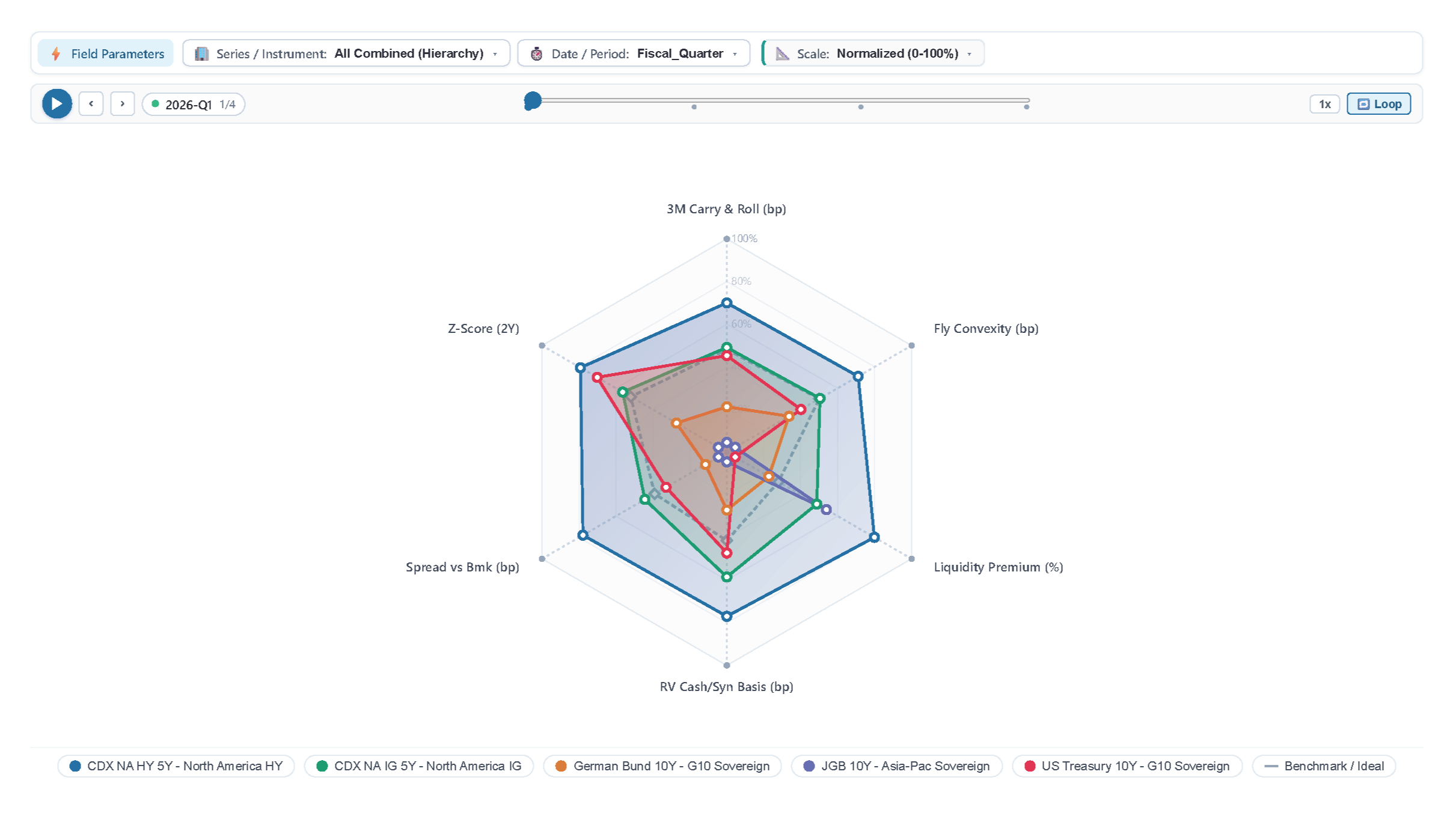
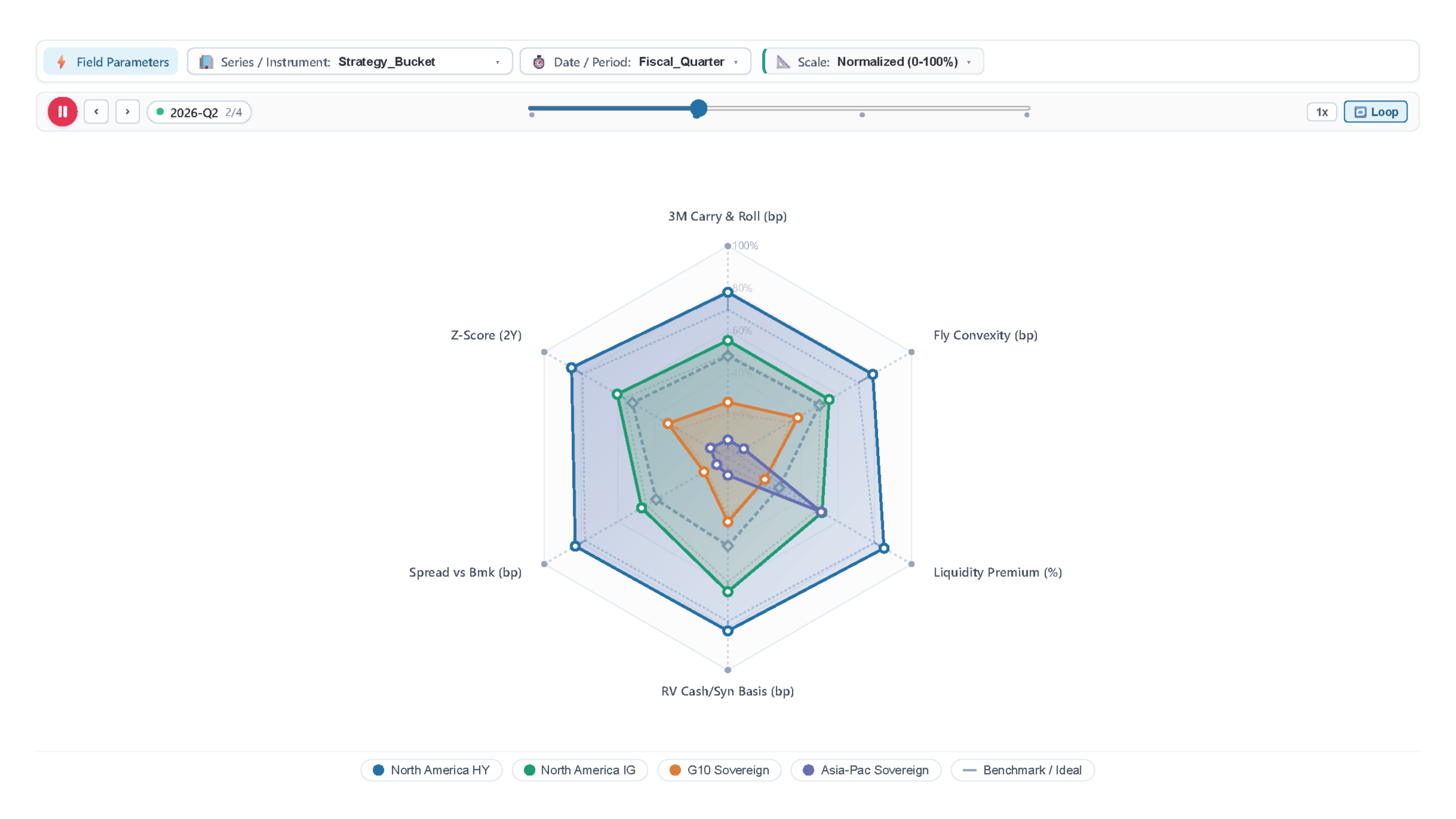
  • Integrated Play Axis & Historical Trajectory Trails: Interactive play scrubber with speed multipliers (0.5x, 1x, 2x), timeline step slider, fading lookback polygon trails, and vertex directional motion paths that visualize chronological profile migration.
  • Dual Scaling Architecture (Normalized & Raw/Absolute): 0–100% min-max scaling to harmonize disparate units alongside an unscaled raw mode with spoke-specific range bounds.
  • Dynamic Toolbar Field Parameter Switchers: Drop multiple columns into field wells to dynamically switch dimensions, time periods, or metrics via toolbar dropdowns, including automated hierarchical combination.
  • Dashed Benchmark Reference Polygon: Overlay neutral target benchmarks with automated positive and negative variance delta calculations displayed directly in tooltips.
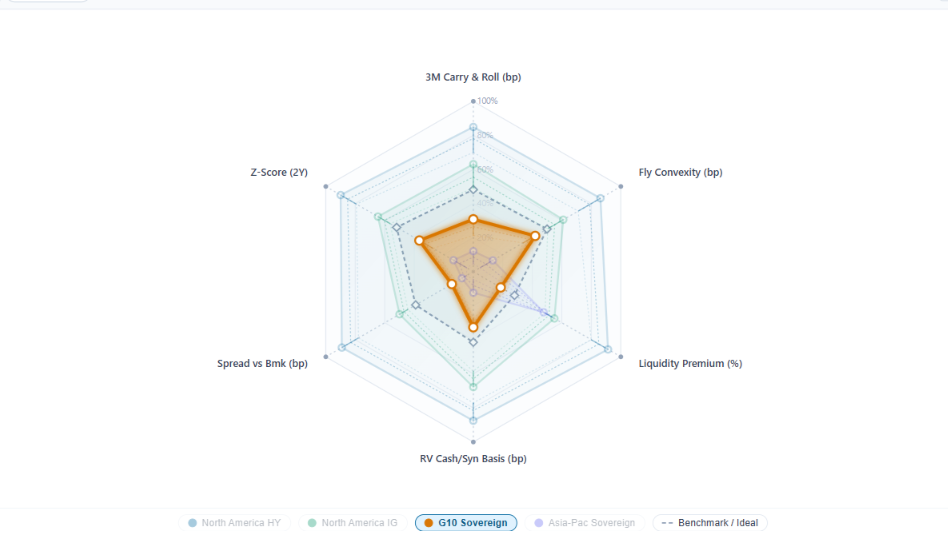
  • Decoupled Layering & Interactive Z-Ordering: Independent SVG event pass-through and top-level vertex nodes allow effortless hover on underlying sheets, automatically bringing active series to the front with glowing highlights while dimming background elements.

These features deliver institutional-level clarity and dynamic time-series tracking for complex multi-metric datasets in Power BI.

Conclusion

In conclusion, the Relative Value & Spread Evolution Radar bridges the gap between static factor profiling and dynamic time-series evolution. By combining multi-series polygonal radar geometry with a chronologically animated Play Axis scrubber, fading trajectory lookback trails, dual normalization modes, and on-the-fly toolbar field parameter switching, it transforms static reports into interactive relative-value analytical platforms. Analysts, traders, and portfolio managers can isolate market outliers, identify factor rotations, compare securities against peer benchmarks, and uncover actionable relative-value opportunities with speed and precision.

Key Features:

  1. Dynamic Multi-Instrument Radar Overlay:

    • Plot multiple securities, desks, or portfolios simultaneously with curated palettes, customizable polygon fill opacity, and stroke thickness.
  2. Chronological Play Axis & Scrubber:

    • Play, pause, adjust speed (0.5x, 1x, 2x), toggle loop animation, and scrub historical timeframes with step indicators to animate factor shifts.
  3. Fading Evolution Trails & Vertex Motion Paths:

    • Visualizes historical footprints with fading opacity across past lookback periods and traces vertex migration vectors across the factor space.
  4. Dual Scaling Engine (Normalized & Raw/Absolute):

    • Seamless toggle between Normalized 0–100% scale for harmonizing disparate metric dimensions and Raw / Absolute mode showing actual observed values with min-max bounds.
  5. Toolbar Field Parameter Switching:

    • Map multiple columns to field wells to instantly toggle between dimensions, securities, or date granularities from the top toolbar dropdowns, including automated "All Combined (Hierarchy)" mode.
  6. Ideal Benchmark Reference Shape:

    • Renders a dashed reference polygon with diamond vertex markers and automated vs-benchmark variance delta calculations.
  7. Dual Data Format Flexibility (Long & Wide):

    • Supports standard Long Format (dimension + measure) as well as Wide Format (multiple numeric measures dragged directly into Value become independent spokes automatically).
  8. Decoupled Layering, Hover Dimming & Interactive Tooltips:

    • Pointer pass-through prevents upper sheets from blocking underlying dots, dynamically raises active series to the front, dims inactive series, and displays rich boundary-clamped tooltips.
  9. Interactive Series Legend:

    • Click series badges to toggle visibility with strike-through styling and hover to isolate individual polygons on the radar canvas.

Other products

Office Solution Capacity Monitoring tool enables organizations to track Centrally:-

HR_Analytics

Custom Slicer

The "Custom Slicer by Office Solution" is a certified Power

Quantile Dot Plot

A quantile dot plot is a powerful visualization tool that represents t

Magic Grid PBI Enterprise Solution

Power BI Magic grid which allows Write back into the database, ML Capa

Barley Trellis chart

The Barley Trellis chart, inspired by Becker et al.'s groundbreaki

Financial Risk and Stock Risk Calculation

Supply Chain Network Flow Chart

Supply Chain Network Flow Chart

Polar Plot Chart

The polar scatter plot is a type of chart that displays data points in